 |
Server Help
Community forums for Subgame, ASSS, and bots
|
| Author |
Message |
Jason
Novice

Age:41
Gender:
Joined: Feb 05 2004
Posts: 57
Offline
|
 Posted: Mon Jun 20, 2005 2:59 am Post subject: Posted: Mon Jun 20, 2005 2:59 am Post subject: |
 |
 |
|
|
I'm not sure if it's even necessary for me to be doing this, but I'm trying to set up port forwarding even though I'm just running a client. I keep running into lag issues (my tinfo is nuts), and port forwarding fixed some problems in other areas (namely filesharing). So then, I thought I'd give it a try with SS as well.
I just have two questions. Do I need to use the server port? (The one that shows up when you right click on a zone in the zone list.) And do I use UDP or TCP or both?
|
|
| Back to top |
|
 |
Mine GO BOOM
Hunch Hunch
What What

Age:42
Gender:
Joined: Aug 01 2002
Posts: 3616
Location: Las Vegas
Offline
|
| Posted: Mon Jun 20, 2005 3:21 am Post subject: |
|
|
|
|
Port forwarding will do nothing for your client. The way Continuum and other clients work, is that they begin talking with the client. Since they send out the first packet, your NAT device (router in your case) notices this, and remembers this connection. So all future data that comes in with similar ports/ips will be forwarded to your system. Its like a temporary port forwarding.
If you are having problems with this, as you feel you are, forwarding the ports won't do much. Clients choose a random local port for their connection. Try connecting to a zone, and typing netstat -a -n -p UDP in a command prompt. Then quit and re-enter the zone or a different one and type the command again. The only way to forward the local ports would be to forward all ports, which would kill the idea of being behind NAT in the first place.
If NAT would forget your connection state, it usually means that your NAT device ran out of memory and it had to remove a state from its table. If you are running a program like Bit Torrent or Kazaa which connects to many people at once, this can cause problems with most home routers, and you'll either need to buy an expensive router or make one running Linux/BSD on a spare computer. Just remember, as soon as you send out a new packet to the zone (ie: ship position, chat message, etc), the NAT device will renew the state in its table, or make a new one. So if it causes problems, it will be for split seconds only.
If your tinfo is off, thats usually a clock problem with your computer. Azureus, a Bit Torrent client, has been a known problem for this. Other things can be hardware related, but usually software related. Try posting a *tinfo of yourself here some time, and I can suggest how big of a problem an unsynced clock will cause you (usually almost nothing, unless you are gaining/losing hours per day on your system clock).
|
|
| Back to top |
|
|
Jason
Novice
Age:41
Gender:
Joined: Feb 05 2004
Posts: 57
Offline
|
| Posted: Mon Jun 20, 2005 3:30 am Post subject: |
|
|
|
|
You hit the nail on the head, MGB. My roommate and I share a 3.0Mbps/768Kbps DSL connection. The greedy bastard seemingly always has torrents going, and while he's not killing our bandwidth, I figured that was the culprit. I've told him countless times to save the downloading for overnight, but he won't listen.
Just how much do you think purchasing a router with a larger NAT table would help me out? I was browsing through the broadbandreports.com forums, and apparently there's a wireless Linksys model that you can get hacked firmware for, allowing for something like 8k entries in the table.
|
|
| Back to top |
|
|
Mine GO BOOM
Hunch Hunch
What What
Age:42
Gender:
Joined: Aug 01 2002
Posts: 3616
Location: Las Vegas
Offline
|
| Posted: Mon Jun 20, 2005 12:52 pm Post subject: |
|
|
|
|
| Jason wrote: | | Just how much do you think purchasing a router with a larger NAT table would help me out? I was browsing through the broadbandreports.com forums, and apparently there's a wireless Linksys model that you can get hacked firmware for, allowing for something like 8k entries in the table. |
You are talking about the WRT54G hacked with the Sveasoft Firmware. Its not hard to do, and it runs pretty well (if you need the firmware, I can give it free, or just search google), but I've never used it. It does many other nice things like traffic shaping.
If you have a spare old computer, try using m0n0wall or IPCop. I use m0n0wall on a 133 mhz running the CD/floppy version for the past 2 years, and it does great. Play around a bit with the traffic shaping, and you can run torrents at full speed without slowing the internet down a bit. Look at the MRTG recording I have of our traffic for the past month. Our maximum upload is a little over 45KBps, and you can see when we have torrents uploading at max speed. Ping (according to an opened Continuum I use) stays at the same range as if uploading nothing.
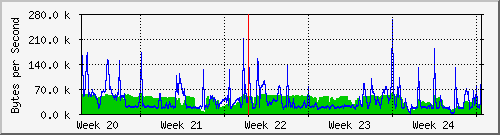
A good way to learn to play with traffic shaping is to set up the different priorities, and set different Subspace zones's ports to different priorities. Like zones I know I'll never enter are set to 1, and when a torrent is going, I can see that the priority level 1 packets can get anywhere from 1000 to 5000 ms pings, while the normal levels get the average 50-200, and the highest priority is static at 10-30 ms. Its all I use Continuum for now-a-days.
IPCop is getting pretty user friendly right now, as m0n0wall is more designed for those that know what they are doing, and to be used for advanced networking.
 m0n0wall-wan-month.png - 3.67 KB
File downloaded or viewed 19 time(s)
|
|
| Back to top |
|
|
Jason
Novice
Age:41
Gender:
Joined: Feb 05 2004
Posts: 57
Offline
|
| Posted: Wed Jun 22, 2005 4:08 pm Post subject: |
|
|
|
|
| Marvelous! Thanks for all the info. I've ordered that router, and it should be here by the end of the week.
|
|
| Back to top |
|
|
|
|
You can post new topics in this forum
You can reply to topics in this forum
You cannot edit your posts in this forum
You cannot delete your posts in this forum
You cannot vote in polls in this forum
You can attach files in this forum
You can download files in this forum
|
Software by php BB © php BB Group
Server Load: 57 page(s) served in previous 5 minutes. |
 FAQ
FAQ Search
 Memberlist
 Usergroups
 Statistics
 Register
 Profile
 Login to check your private messages
 Login
Login

 plz help im banned from all for amazin...


