| Author |
Message |
Grunge
Novice
Age:37
Gender:
Joined: Dec 21 2004
Posts: 26
Offline
|
 Posted: Tue Dec 28, 2004 5:19 pm Post subject: Dear Bak, or anyone else. Posted: Tue Dec 28, 2004 5:19 pm Post subject: Dear Bak, or anyone else. |
 |
 |
|
|
How can I get rid of this black shit. I finally figured I could do a shipset, and I don't know what to do. I use Cinema4D and Photoshop.
Last edited by Grunge on Wed Dec 29, 2004 11:29 pm, edited 1 time in total |
|
| Back to top |
|
 |
Grunge
Novice
Age:37
Gender:
Joined: Dec 21 2004
Posts: 26
Offline
|
| Posted: Tue Dec 28, 2004 5:28 pm Post subject: |
|
|
|
|
| Ok, Yikes. It's your program I'm guessing - not giving me true black, thus not transparent. So..... can this be fixed on your end? For now obviously I'm going to fix it manually, but it would be nice if you could fix it.
|
|
| Back to top |
|
|
Muskrat
Server Help Squatter

Age:38
Joined: Aug 24 2004
Posts: 829
Location: Swamp
Offline
|
| Posted: Tue Dec 28, 2004 5:38 pm Post subject: |
|
|
|
|
| hey its me!! ^
|
|
| Back to top |
|
|
Purge
Episode I > Eposide III
Jar-Jar is kool

Age:36
Gender:
Joined: Sep 08 2004
Posts: 2019
Offline
|
| Posted: Tue Dec 28, 2004 5:40 pm Post subject: |
|
|
|
|
| The blackness has to do with your rotation of the ships.
|
|
| Back to top |
|
|
Grunge
Novice
Age:37
Gender:
Joined: Dec 21 2004
Posts: 26
Offline
|
| Posted: Tue Dec 28, 2004 6:07 pm Post subject: |
|
|
|
|
I knew that.
I inverted the colors and saw that the *black* part wasn't *all black*, and I fixed what I was able to, but there's still a little around the edges.
|
|
| Back to top |
|
|
Purge
Episode I > Eposide III
Jar-Jar is kool
Age:36
Gender:
Joined: Sep 08 2004
Posts: 2019
Offline
|
| Posted: Tue Dec 28, 2004 6:12 pm Post subject: |
|
|
|
|
Also, are you rotating the ships under 1 ships.bm2 file, or are you making them into 8 files, combining them into a .lvz? Making your own ships in the ships.bm2 is kind of faulty under my opinion. 
|
|
| Back to top |
|
|
shardz
Novice
Joined: Dec 30 2003
Posts: 26
Offline
|
| Posted: Tue Dec 28, 2004 7:13 pm Post subject: |
|
|
|
|
It may help to rotate a totally square image to begin with.. . what are you using to rotate with? . what are you using to rotate with?
|
|
| Back to top |
|
|
Bak
?ls -s
0 in

Age:26
Gender:
Joined: Jun 11 2004
Posts: 1826
Location: USA
Offline
|
| Posted: Wed Dec 29, 2004 12:12 am Post subject: |
|
|
|
|
Your black around the edges isn't truely black. Can you show me the base image you used for rotating the ships?

 shipZoomed.PNG - 15.31 KB
File downloaded or viewed 19 time(s)
|
|
| Back to top |
|
|
Grunge
Novice
Age:37
Gender:
Joined: Dec 21 2004
Posts: 26
Offline
|
| Posted: Wed Dec 29, 2004 5:15 pm Post subject: |
|
|
|
|
I tried ficxing it, but it's still there.
The files are attached.

Cinema 4D/PSD/JPG
ss_ship1.zip - 16.89 KB
File downloaded or viewed 18 time(s)
|
|
| Back to top |
|
|
Purge
Episode I > Eposide III
Jar-Jar is kool
Age:36
Gender:
Joined: Sep 08 2004
Posts: 2019
Offline
|
| Posted: Wed Dec 29, 2004 6:27 pm Post subject: |
|
|
|
|
Here, this is a fixed version of your ship. Works fine for me. 
ships.zip - 31.77 KB
File downloaded or viewed 15 time(s)
|
|
| Back to top |
|
|
Bak
?ls -s
0 in
Age:26
Gender:
Joined: Jun 11 2004
Posts: 1826
Location: USA
Offline
|
| Posted: Wed Dec 29, 2004 6:32 pm Post subject: |
|
|
|
|
purge: upgrade you're rotator program to EZ Image Rotator 1.4 now with antialiasing!
you're using a JPEG to rotate. JPEG is a LOSSY format, meaning that information is lost whenever you save it to compress it and save space. This might yield to an off black color where you intended for a black color to be. If one of these off black spots were to end up in the upper left corner, the rotater would use that as the background color and what you saw would occur. The solution is to save it as a LOSSLESS format, such as a PNG. Then fill in the picture with a nonblack color such as red and then make everything you want to be black red. Finally fill the red with pure black and load that PNG file into the rotator program.
Step 1:

Step 2:

Step 3:
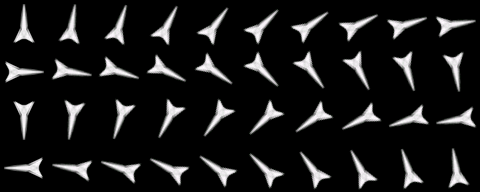
final.PNG - 26.7 KB
File downloaded or viewed 17 time(s)
zoomedIn3.PNG - 5.5 KB
File downloaded or viewed 17 time(s)
zoomedIn2.PNG - 6.5 KB
File downloaded or viewed 18 time(s)
|
|
| Back to top |
|
|
Grunge
Novice
Age:37
Gender:
Joined: Dec 21 2004
Posts: 26
Offline
|
| Posted: Wed Dec 29, 2004 6:47 pm Post subject: |
|
|
|
|
Sonofabitch.
This is my first shipset, so I'm not putting 110% into it, but thanks .
Edit: SOS's image rotator works well too.

Warbird

Javelin

Spider

Leviathan

Terrier

Weasel

Lancaster

Shark
|
|
| Back to top |
|
|
Grunge
Novice
Age:37
Gender:
Joined: Dec 21 2004
Posts: 26
Offline
|
|
| Back to top |
|
|
Purge
Episode I > Eposide III
Jar-Jar is kool
Age:36
Gender:
Joined: Sep 08 2004
Posts: 2019
Offline
|
| Posted: Sun Jan 02, 2005 1:17 pm Post subject: |
|
|
|
|
Nice ships there. 
|
|
| Back to top |
|
|
Bak
?ls -s
0 in
Age:26
Gender:
Joined: Jun 11 2004
Posts: 1826
Location: USA
Offline
|
| Posted: Sun Jan 02, 2005 1:29 pm Post subject: |
|
|
|
|
| you can save yourself some bandwidth and everyone space by distributing them as .PNG files instead of .bm2. Continuum will interpret them just fine.
|
|
| Back to top |
|
|
Grunge
Novice
Age:37
Gender:
Joined: Dec 21 2004
Posts: 26
Offline
|
| Posted: Sun Jan 02, 2005 7:49 pm Post subject: |
|
|
|
|
I plan to redo the weasel. It's just too big. Once the server goes back up, I'll have realistically unlimited bandwidth.
So no worries.
|
|
| Back to top |
|
|
Muskrat
Server Help Squatter
Age:38
Joined: Aug 24 2004
Posts: 829
Location: Swamp
Offline
|
| Posted: Sun Jan 02, 2005 8:09 pm Post subject: |
|
|
|
|
| lol, dont think thats what bak meant.... and did you really reply with a pm to the message shardz had sent you hours earlier in that screen^
|
|
| Back to top |
|
|
|

 FAQ
FAQ Search
 Memberlist
 Usergroups
 Statistics
 Register
 Profile
 Login to check your private messages
 Login
Login

 Directory Server


