1st Page 2000
Bak - Mon Aug 15, 2005 6:54 pm
Post subject:
You want the programmer's notepad:
http://www.pnotepad.org/
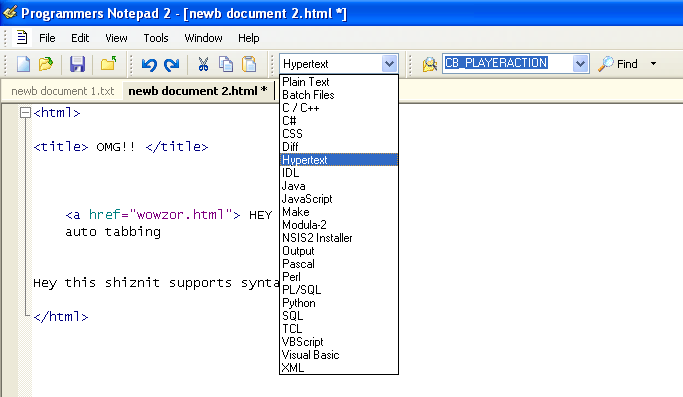
It's a simple plain text editor, with tabbing support and synax highlighting for many different types of files. It also supports branching for code. I think you can compile with it too, but I haven't set that up on mine. It's lightweight.
Cerium - Mon Aug 15, 2005 8:02 pm
Post subject:
PN2 has quite a few bugs for a text editor...
Personally, EditPlus (http://www.editplus.com/) has worked great for my standalone file editor, but I still bust out the appropriate IDE for projects.
From the readme.txt--
Code: Show/Hide What is EditPlus ---------------- EditPlus is an Internet-ready 32-bit text editor, HTML editor and programmer's editor for Windows. While it can serve as a good replacement for Notepad, it also offers many powerful features for Web page authors and programmers. * Syntax highlighting for HTML, CSS, PHP, ASP, Perl, C/C++, Java, JavaScript and VBScript. Also, it can be extended for other programming languages based on custom syntax files. * Seamless Web browser for previewing HTML pages, and FTP commands for uploading local files to FTP server. * Other features include HTML toolbar, user tools, line number, ruler, URL highlighting. auto-completion, cliptext, column selection, powerful search and replace, multiple undo/redo, spell checker, customizable keyboard shortcuts, and more. SHAREWARE --------- EditPlus is not free software. You may use this software for evaluation purposes without charge for a period of 30 days. If you use this software after the 30 day evaluation period, you must pay registration fee. See 'How to register' on the Online Manual. Distribution ------------ You may distribute the evaluation version of this software and documentation in its unmodified form via electronic means. But you should not charge or requesting donations for any such copies however made and from distributing the software and/or documentation with other products without the author's written permission. System Requirement ------------------ * Windows 95/98/Me/NT4/2000/XP or higher. * IE 3 or higher for browser feature (optional). Installation ------------ If you downloaded a self-extracting setup file (eppxx.exe), just run the executable. If you downloaded a zip file (eppxx.zip), extract it to a temporary directory, then execute SETUP_EP.EXE. Spell Checker ------------- You can download spell checker from our web site. http://www.editplus.com/download.html The Sentry Spelling-Checker Engine Copyright ?1999 Wintertree Software Inc. Remove ------ Run 'Uninstall' on the EditPlus Start Menu folder or open 'Add/Remove Programs' in Control Panel and double-click 'EditPlus 2' in the list box. Feedback -------- For feedback, questions and any comments: - E-mail support@editplus.com - Homepage http://www.editplus.com/ |
Bak - Mon Aug 15, 2005 8:11 pm
Post subject:
I've noticed no bugs
SuSE - Mon Aug 15, 2005 9:32 pm
Post subject:
Have you tried jEdit, Doc?
It's Java, you should love it.

Cerium - Mon Aug 15, 2005 10:25 pm
Post subject:
Bak, I looked at the bug list... its quite long (9 pages at 30 per page)
Bak - Mon Aug 15, 2005 11:04 pm
Post subject:
and yet, I've noticed none of them while using the program
D1st0rt - Tue Aug 16, 2005 2:02 am
Post subject:
EditPlus is shareware
I suggest just searching SF for "Editor", it produced a bunch of results
Cerium - Tue Aug 16, 2005 2:54 am
Post subject:
EditPlus is nagware. It never expires; It just bugs the hell out of you to buy it with a message box on startup.
Donkano - Tue Aug 16, 2005 3:09 am
Post subject:
Cerium:
There is such a thing as serials and cracks.
Maverick - Tue Aug 16, 2005 4:34 am
Post subject:
there is nothing wrong with cracks - they aren't warez you know...
Solo Ace - Tue Aug 16, 2005 7:47 am
Post subject:
Wth? GTFO with that Mav.
Don't let these forums turn into warez forums.
Cerium - Tue Aug 16, 2005 8:02 am
Post subject:
Donkano, Im well aware of cracks/keygens/etc. I just assumed anyone else reading these forums would be as well =P
Gravitron - Tue Aug 16, 2005 11:51 am
Post subject:
CEdit and 1st page are the best editors I came across.
Both are professional, function in a psuedo-compiler environment and offer a wide variety of features.
Solo Ace - Wed Aug 17, 2005 4:56 pm
Post subject:
Mav, how are cracks not wrong?
They are tools with the only purpose to bypass a licensing system for paid software, "cracking software".
The word used for "cracked software" and other stolen media is "warez".
How would it not be wrong to distribute a program with that purpose and that purpose only?
Textpad is the only good text editor, I think, CEdit and EditPlus are ugly/annoying.
Donkano - Wed Aug 17, 2005 4:59 pm
Post subject: